
YouTube ads can be cheap. They can also be a money pit.
The difference is almost always targeting. Show a great ad to the wrong people and you pay for views that never buy. Show an average ad to the right people and the sales roll in.
Here's how to target the right audience with YouTube ads in 2026, in plain English.
How YouTube Ad Targeting Works
YouTube ads run through Google Ads. When you set up a campaign, you tell Google who should see your ad and where it should appear.
There are two big ways to do that.
- Target people. Choose viewers by who they are and what they're interested in, wherever they watch.
- Target content. Choose the channels, videos and topics your ad should appear on, whoever is watching.
The best campaigns usually mix both, then trim what doesn't work.
Start by Knowing Your Buyer
Targeting is easy once you know exactly who you're looking for. Before you open Google Ads, answer a few quick questions.
- Who buys from you most often? Age, job, family, location.
- What problem are they trying to solve?
- What do they search for before they buy?
- Which YouTube channels and creators do they watch?
- Which competitors do they compare you with?
Write the answers down. Every targeting choice that follows comes straight from this list.
Pick the Right Campaign Type First
Your campaign goal changes which targeting options you get.
| Goal | Campaign Type | Good For |
|---|---|---|
| Sales and leads | Demand Gen | Clicks and conversions, with lookalike audiences |
| Views | Video views campaign | Getting your video watched cheaply |
| Awareness | Video reach campaign | Showing your ad to as many people as possible |
Demand Gen leans on audiences and Google's AI. Video views and reach campaigns give you more control over where your ads appear, including specific channels and videos.
Know Your Ad Formats
Targeting and format work together. The same audience reacts differently to a 6-second bumper and a 2-minute story.
- Skippable in-stream ads play before or during videos and can be skipped after five seconds. Great for most goals.
- Non-skippable ads run for 15 seconds or so and can't be skipped. Good for short, punchy messages.
- Bumper ads are 6 seconds long. Perfect for reminders and remarketing.
- In-feed ads show up in YouTube search results and recommendations. Viewers choose to click, so they're often very interested.
- Shorts ads play between Shorts in the vertical feed. Ideal for younger, mobile audiences.
Match the format to the audience. Cold viewers need a quick hook and a reason to care. Warm viewers just need a nudge.
8 Ways to Target the Right Audience
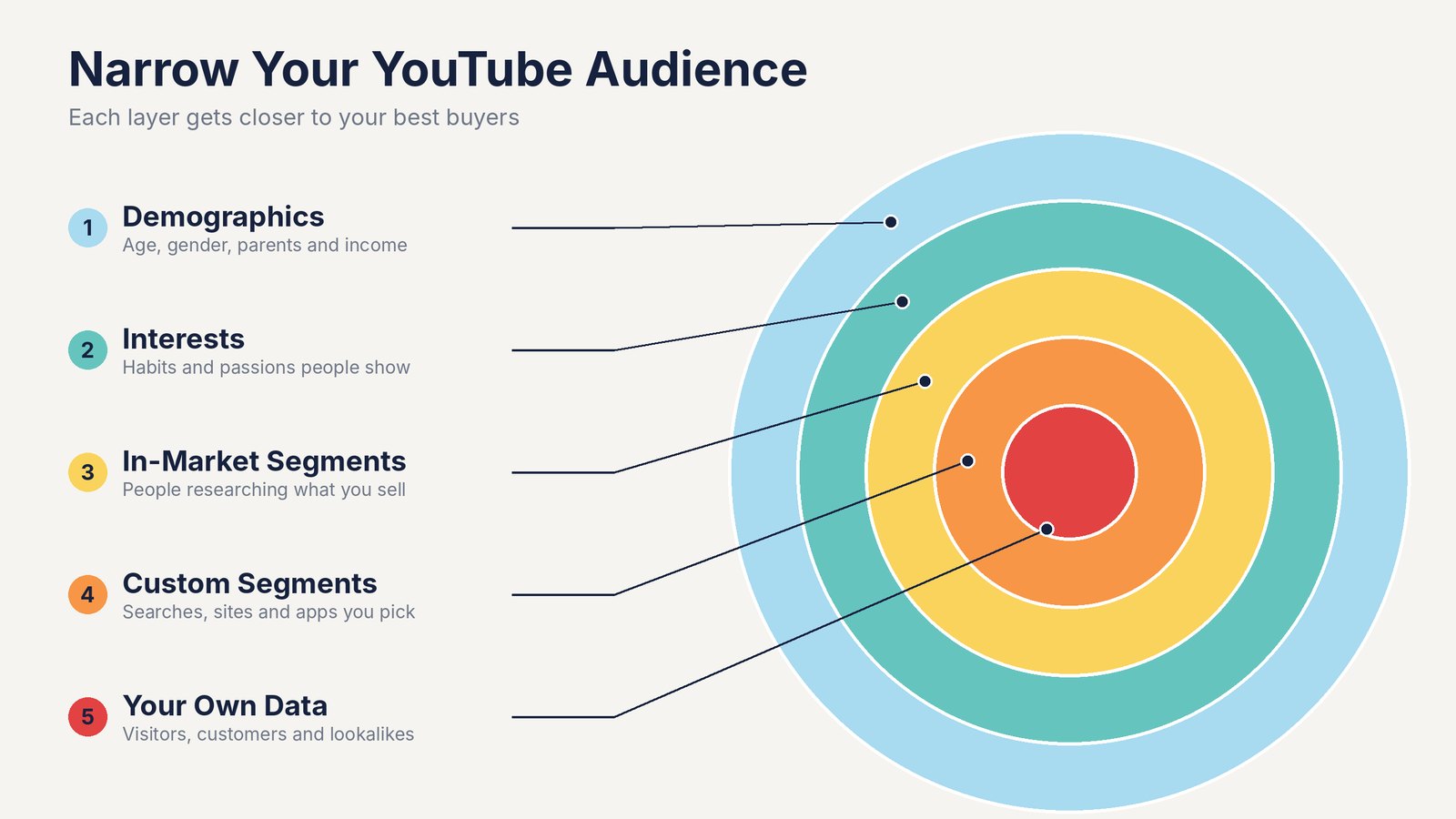
1. Demographics
Start with the basics. Age, gender, parental status and household income in some countries.
Selling retirement planning? Skip the 18 to 24 crowd. Selling baby products? Parents first. Simple filters like these cut waste straight away.
2. Interests (Affinity Segments)
Affinity segments are people with a long-term passion, like cooking fans, gamers, fitness lovers or travel buffs.
They're great for awareness, because they're broad. Just don't expect them to be ready to buy today.
3. In-Market Segments
These are people Google believes are actively researching a purchase. Shopping for a car. Looking for software. Planning a trip.
In-market segments are often the quickest win for sales, because these viewers are already in buying mode.
4. Custom Segments
This is where it gets powerful. You build your own audience by adding keywords people search for on Google, websites they visit or apps they use.
Add your competitors' website addresses, for example, and Google finds people with similar interests. Add search terms like "best running shoes for flat feet" and you reach people who searched for exactly that.
5. Your Own Data
Your warmest audience is the people who already know you.
You can target website visitors, people who watched your YouTube videos or subscribed to your channel, and customer lists you upload. These remarketing audiences usually convert far better than strangers.
6. Lookalike Segments
In Demand Gen campaigns, you can ask Google to find new people who look like your best customers or viewers. It's a simple way to grow beyond your existing audience without guessing.
7. Placements
Placements let you pick the exact YouTube channels and videos where your ad appears.
This is the most precise targeting on YouTube. Your competitors' channels, popular reviews in your niche, tutorials your buyers watch. Put your ad right in front of people who are already watching content about what you sell.
There's one catch. You can only place ads on channels and videos that show ads, which means monetized content. More on that in a moment.
8. Keywords and Topics
Keywords match your ad to videos about those words. Topics let you pick whole categories, like fitness or personal finance.
They're wider than placements but still keep your ads close to relevant content.
Mixing Targeting Without Shrinking Your Audience Too Much
Here's a common mistake. Advertisers stack five layers of targeting and end up with an audience so small that the ads barely run.
Start simple. One campaign with in-market or custom segments. Another with placements. Compare them. Then narrow down what works instead of guessing up front.
Example Targeting Setups
Here's how three different businesses might target their YouTube ads.
| Business | Audience Targeting | Content Targeting |
|---|---|---|
| Online fitness coach | In-market for fitness gear, custom segment of searches like home workout plan | Placements on home workout and nutrition channels |
| Local dentist | People within a few miles, ages 25 to 55, parents | Topics like health and family, plus local news channels |
| Software for freelancers | Custom segment of competitor websites, in-market for business software | Placements on freelancing and productivity channels |
Notice how each setup comes straight from knowing the buyer. That's the whole secret.
Exclusions Matter as Much as Targeting
Who you leave out is just as important as who you include.
- Exclude kids' content if your product isn't for children.
- Exclude existing customers from ads meant for new buyers.
- Exclude poor placements that get views but never clicks or sales.
- Use content suitability settings to keep your brand away from content you don't want to appear next to.
Check the placement report every week and exclude the channels that waste money. It's one of the fastest ways to lower costs.
The Placement Problem, and How to Solve It
Placement targeting is the sharpest tool YouTube gives you. But finding good placements is hard work.
You can only target channels and videos that are monetized. Search YouTube for your niche and you'll find hundreds of videos, many of them without ads, many of them off-topic. Checking each one by hand takes hours.
That's the job we built TubeTarget for.
How TubeTarget Finds the Best Placements

TubeTarget is our own YouTube ads tool at Teknikforce. It finds the monetized channels and videos in your niche that you can actually place ads on, and filters out the unmonetized noise.
Type in your niche or your competitors, and TubeTarget builds a targeted list of placements. Paste them into Google Ads, and your ads appear right where your buyers are already watching.
- Finds monetized YouTube channels and videos in any niche
- Filters out unmonetized and irrelevant results
- Helps you target your competitors' audiences
- Online SaaS, works on any computer with a browser
- Video training on running profitable YouTube ads
- 24x6 live chat support
Pricing $5.58 a month, paid yearly ($67 a year), or $6.99 month to month, with a 30-day money-back guarantee.
Tips for Better YouTube Ad Results
- Hook in five seconds. Skippable ads can be skipped after five seconds, so lead with your best line.
- Match the ad to the audience. A remarketing ad can be direct. An ad for strangers should explain who you are.
- Use a clear call to action. Tell viewers exactly what to do next.
- Send traffic to a matching page. The landing page should continue the story the ad started.
- Test several videos. Different hooks work for different audiences.
- Give it time. Let campaigns gather some data before you judge them.
Which Numbers to Watch
| Metric | What It Tells You |
|---|---|
| View rate | How many people watched instead of skipping |
| Click-through rate | Whether your ad makes people want to learn more |
| Cost per view | How cheaply you reach your audience |
| Conversions | How many viewers became leads or buyers |
| Cost per conversion | The number that decides if the campaign is profitable |
Views are nice. Sales pay the bills. Judge every targeting choice by its cost per conversion.
Common Targeting Mistakes
- Targeting everyone and hoping the algorithm figures it out
- Stacking so many filters that the ad barely runs
- Ignoring the placement report and paying for junk views
- Sending warm and cold audiences the same ad
- Forgetting to exclude existing customers
- Judging a campaign after just a day or two
How Much Do YouTube Ads Cost?
There's no fixed price. You set a budget and bid, and costs depend on your niche, your targeting and how good your ad is.
Broad audiences are usually cheaper per view but convert less. Tight targeting like placements and remarketing can cost more per view but often costs less per sale, which is what really counts.
Start with a small daily budget, measure your cost per lead or sale, and scale what works.
A Simple Plan to Get Started
| Step | What to Do |
|---|---|
| 1 | Pick one product and one goal, like leads or sales |
| 2 | Make two or three short ads with different hooks |
| 3 | Run one campaign on in-market or custom segments |
| 4 | Run another on hand-picked monetized placements |
| 5 | Add a remarketing campaign for website visitors |
| 6 | Check results weekly, exclude waste, scale winners |
Final Thoughts
Great YouTube ads start with great targeting. Know who your buyer is, find where they watch, and put your ad right there.
Use in-market and custom segments to reach people ready to buy, remarketing to win back visitors, and placements to show up on the exact channels your buyers love.
And if finding the right placements feels like a chore, let TubeTarget do the digging for you.
FAQs About YouTube Ad Targeting
Can I show my ad on a specific YouTube channel?
Yes, with placement targeting in video campaigns, as long as the channel is monetized and shows ads.
Can I target my competitors' viewers?
Yes. Place ads on their monetized channels and videos, or build a custom segment using their website addresses and brand searches.
What is the best YouTube ad targeting for sales?
Remarketing to your own visitors and in-market segments usually bring sales fastest. Well-chosen placements in your niche come close behind.
Do I need a big budget for YouTube ads?
No. You can start with a small daily budget. Good targeting matters more than a big spend.